Copy for Originals · Free tool · AI search
Can AI read your website? A free tool to find out
“Can AI read my site?” is a free tool. It checks if ChatGPT, Claude and Perplexity can find the facts they quote, like your prices and dates. It also checks if your server lets their crawlers in. That matters because an AI can’t recommend what it can’t read. To spot a hidden block, it asks for your page as each AI crawler and as Google and Bing, which nearly every site lets in. Then it writes a prompt that lists the facts your page is missing. About a minute after you type in a web address, you get a short report that says what to fix.
Short answer
Being readable is the first step to showing up in AI answers. This tool tests that step. It reads your page the way most AI crawlers do, without running JavaScript. Then it tells you if your prices, dates and main text are easy to find. It also asks for your page using the names of AI crawlers, Google and Bing. That shows if a firewall is turning AI tools away. You can run it on your own computer. Your IT team can also run it on a company server for everyone.
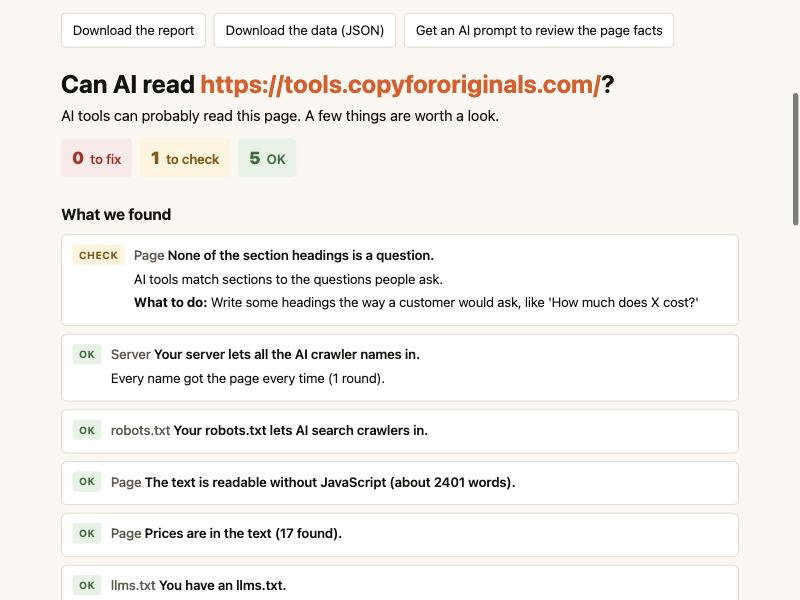
What does the tool check?
It checks three things, in this order. Each result is marked Fix, Check or OK, with a plain “what to do” line.
- Can an AI find the facts on your page?
It counts the words a crawler can see without JavaScript. It looks for prices, dates and hidden text. It checks if your headings are written as questions. It also flags prices that only live in hidden code.
- Does your server let AI crawlers in?
It asks for your page as a normal browser, as nine AI crawlers, and as Google and Bing. It does this a few times, in a random order. Then it compares the answers.
- What does your robots.txt say?
robots.txt is a small file that tells crawlers what they may read. The tool reads yours the way the official rules say crawlers should. It shows which AI crawlers may read the page you checked.
Why check the facts, not just the door?
Because an AI can get into your site and still find nothing to quote. Checking the door is a good start, and several free tools do it well. This tool also looks at what’s inside.
- Most AI crawlers don’t run JavaScript. The crawlers from OpenAI, Anthropic, Meta, ByteDance and Perplexity read the raw page. If your text is added by a script, they may see almost none of it.
- Hidden prices don’t count. Many sites put prices in hidden code called structured data. In one test, none of five AI tools found a price that only lived there. The tool tells you when a price is only in that code.
- Prices and dates help. In 252,000 tests across six AI models, pages with clear prices and recent dates were picked more often. Layout changes alone made no difference.
- Hidden text can get thrown away. Answers inside closed tabs or accordions may be dropped when a page is read.
The tool can also write a prompt for you. Paste it into ChatGPT, Claude or Gemini. The AI then lists which facts your page is missing: price, what’s included, who it’s for, how long it takes and what can go wrong.
Why these things matter is explained in our guide, what decides whether an AI recommends you.
Why does it test several times and compare with Google?
Because one test can fool you. This is the method from our study of 100 law firm websites.
In that study, 13 of 78 sites turned away an AI crawler’s name every time. But 12 of those 13 sites had nothing in robots.txt to show it. The block came from a firewall, a hosting company or a security plugin. The owner usually didn’t know. And 11 of the 13 let Google’s and Bing’s names in.
So the tool asks several times, a few seconds apart. It also asks as Google and Bing. Comparing the answers tells you what kind of problem you have:
| What you see | What it probably means | What to do |
|---|---|---|
| AI names turned away. Google and Bing let in. | A rule is aimed at AI crawlers. | Ask your host or IT team about bot rules. |
| AI names and Google or Bing turned away. | Your server may check if visitors are real. The real crawler may get in. | Look in your server logs. |
| Sometimes let in, sometimes not. | Often a limit on how many requests come in at once. | Run the check again later. |
| Everyone let in. | No block from this test. | Move on to the facts on the page. |
Are there other free tools that check AI crawler access?
Yes, and some are very good. If you only want to know if AI crawlers can reach your home page, try one of these. You don’t need to install anything.
- 365i AI Crawler Checker. Asks for your page as 12 AI crawlers and a browser, and reads robots.txt. No sign-up.
- Zeevron AI Crawler Checker. Asks for your page as a browser and as each AI crawler. No sign-up.
- RankX AI Crawler Access Checker. Asks as 24 AI crawlers, more names than our tool. No account.
- TryGeoSuite ai-crawler-bots. A free, open-source command-line tool for developers.
Use our tool when you also want to know if an AI can find the facts on your page. Use it when you want the Google and Bing comparison. Or use it when your company wants to run the test on its own server.
How do you run it?
You need Python 3.9 or newer. Macs already have it. There is nothing else to install.
The easy way: a web page on your computer
- Go to the project on GitHub. Click the green Code button, then Download ZIP. Unzip it.
- Open Terminal. Type
cdand a space, drag the unzipped folder into the window, and press Enter. - Type this line and press Enter:
python3 -m can_ai_read serve --open - Your browser opens. Type in your web address and click Check now.
The command line
Type the command and your address. The report prints in Terminal.
python3 -m can_ai_read https://yoursite.com/Add --html report.html to save a report you can send to someone. Add --prompt prompt.txt to save the AI prompt.
For your whole team
Your IT team can run the web page on a company server with Docker. The IT guide covers the settings, sign-in and network rules. By default, the server will not check private or internal addresses. IT can also limit it to your own domains.
How do you read the results?
| Result | What it means | Examples |
|---|---|---|
| Fix | Something is probably keeping AI tools out, or hiding your facts. | Your server turns away OAI-SearchBot. Most of the page is built by JavaScript. A price is only in hidden code. |
| Check | Worth a look. It may be fine, or it may be a choice someone made. | No prices in the text. No visible date. You block AI training crawlers. |
| OK | Nothing to do. | All crawler names let in. Text readable without JavaScript. |
One result needs a word of care. Blocking training crawlers like GPTBot and ClaudeBot keeps your pages out of AI training. It does not remove you from AI answers. Blocking search crawlers like OAI-SearchBot does. The tool keeps the two apart.
What the tool can’t tell you
- It is not the real crawler. The test comes from your computer or server, not from OpenAI, Anthropic or Perplexity. A site can treat the real crawlers differently. Only your server logs show what they really got.
- It checks one page at a time. Check your most important pages: home, prices and your main services.
- It can’t promise you’ll be recommended. Being readable is the first step. What else matters is in our guide.
- Bot protection may block the tool itself. If even the normal browser test is turned away, the report says so.
FAQ
Is the tool really free?
Yes. “Can AI read my site?” is free and open source under the MIT license. You can use it, change it and share it. It runs on your own computer or server, so there is no account and no sign-up.
Does the tool send my data anywhere?
No. The tool only contacts the website you ask it to check. It has no tracking. The web version keeps results in memory for one hour and never saves them to disk.
Will checking my site cause problems?
It shouldn’t. A standard check sends about 35 requests to the page over a minute or two, spaced out and in a random order. Only check sites you own or have permission to test.
Why does the tool pretend to be Googlebot?
To compare. If your server lets Google’s name in but turns away an AI crawler’s name, the block is probably aimed at AI tools. If it turns away both, your server may be checking whether visitors are real, and the real crawlers may get in. In our study of 100 law firm websites, 11 of the 13 sites that blocked an AI crawler’s name let Google’s and Bing’s names in.
What should I do if the tool finds a problem?
Each result in the report says what to do. Most server blocks come from a firewall, a hosting company or a security plugin, so start by asking whoever runs those. For problems with the facts on your page, start with price, a visible date and text that shows without JavaScript.
Sources
- Copy for Originals, “Do law firm websites block AI crawlers?”, version 2, October 14, 2026 (13 of 78, 12 of 13, 11 of 13).
- Copy for Originals, “How to write content that LLMs retrieve and cite” (crawlers and JavaScript; hidden text).
- Vercel, “The rise of the AI crawler.” vercel.com
- searchVIU, test of what ChatGPT, Claude, Perplexity and Gemini extract from schema markup. searchviu.com
- Vishwakarma et al., “What Gets Cited: Competitive GEO in AI Answer Engines,” SIGIR 2026 (252,000 trials). arXiv 2605.25517
- RFC 9309, “Robots Exclusion Protocol,” September 2022. rfc-editor.org
- OpenAI, overview of OpenAI crawlers. developers.openai.com
- The four other checkers were opened on October 17, 2026.
The tool’s code: github.com/jbastide/can-ai-read-my-site.